I only recently discovered this behaviour in a Keycloak installation. Once I knew what to look for, I noticed that the same feature had been misconfigured in several other places.
Add one parameter to an otherwise normal OpenID Connect login request:
kc_action=UPDATE_PROFILE
Log in through the configured identity provider and before returning to the application, Keycloak presents an Update Account Information page. Sometimes it only contains first and last name. On other installations it also contains the email address and additional attributes.
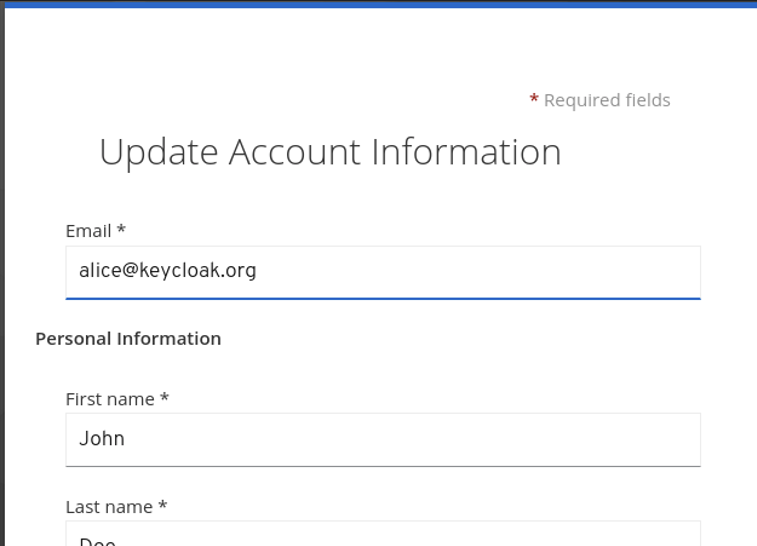
That page is part of a documented Keycloak feature called Application Initiated Actions (AIA).1 The feature itself is useful. The configuration around it is often not quite finished.
The IdP has just verified his data Link to heading
The interesting case is when Keycloak acts as an identity broker for another OpenID Connect or SAML provider.
The external IdP authenticates the user and returns claims such as email, first name and last name. Keycloak maps these values to its local user and may even mark the email as trusted. The application then receives its tokens from Keycloak.
So far, so good.
But an AIA is processed as part of the same authorization flow. After the IdP login, and before the authorization code is returned to the client, UPDATE_PROFILE can ask the user to edit the profile that was just populated by the IdP.
The IdP confirms who I am. Keycloak then asks me who I would like to be.
Keycloak uses the same user profile configuration for several end-user contexts: registration, broker profile review, the Account Console and UPDATE_PROFILE.2 If the realm allows a user to edit an attribute, its origin at the external IdP does not make it read-only.
The request looks like this:
https://sso.example.com/realms/example/protocol/openid-connect/auth
    ?client_id=example-app
    &redirect_uri=https%3A%2F%2Fapp.example.com%2Fcallback
    &response_type=code
    &scope=openid
    &kc_action=UPDATE_PROFILE
And the flow looks like this:
- The client starts an OIDC authorization request.
- The user authenticates at the external IdP and Keycloak imports the claims.
- Keycloak executes
UPDATE_PROFILE. - The user changes one of the fields shown on the page.
- Keycloak continues the flow with the resulting local profile.
External IdP claim -> trusted by Keycloak -> changed by the user -> sent to the client
Depending on the existing SSO session and the maximum authentication age configured for the action, the user may not even have to enter credentials again. The Keycloak session can be enough to reach the form.
This only changes the profile of the authenticated account. It does not allow one user to edit another user’s record. The problem is what applications and people believe about the changed values afterwards.
An email address is rarely just profile data Link to heading
I still see applications using email addresses as database keys, account-linking attributes or even as part of an authorization decision. Others assume that an email received from their Keycloak broker must be verified because the upstream IdP verifies emails.
With Trust Email enabled, Keycloak can accept the verification performed by the external IdP.3 That trust belongs to the address supplied by that IdP. It should not follow a new address typed into a profile form a few seconds later.
The exact result depends heavily on the version and configuration. Keycloak may reset email_verified, require a new verification or prevent the change. Unfortunately, relying applications do not always evaluate email_verified. Quite a few simply consume email and call it a day.
Modern Keycloak versions have a separate UPDATE_EMAIL workflow.4 It can require re-authentication, keep the new address pending and verify it before replacing the old one. When that workflow is enabled, current Keycloak versions no longer show an existing email address in UPDATE_PROFILE.
That is a much better separation. It is also one of the reasons this finding varies so much between installations. Older releases, migrated realms and custom themes can all behave differently. You have to test the actual installation.
Names are not harmless either Link to heading
First and last name do not usually grant access to anything. Still, they appear everywhere: comments, approvals, tickets, document owners, exports and audit views.
If I can replace the name supplied by my corporate IdP with the name of a colleague, these interfaces may show my actions under somebody else’s name. The token subject still belongs to my account, but most people reviewing a ticket or CSV export will never see that subject.
This may not be an account takeover, but it is enough for impersonation and misleading audit records. Human-readable identity data matters precisely because humans read it.
The error message becomes a user search Link to heading
There is another side effect I have seen on these pages. Submit an email address that is already assigned to a different Keycloak user and the form may tell you exactly that.
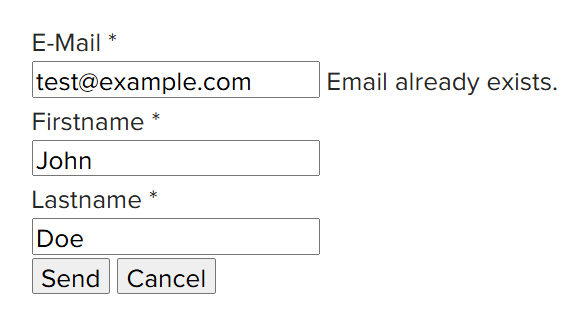
An attacker with any valid account can now distinguish between:
- An email address already registered in the realm
- An email address not currently in use
That is account enumeration through a profile edit form. It can reveal employees, customers or membership in a service that was never meant to be public. Such information is also valuable for targeted phishing campaigns. It lets attackers focus on confirmed users and tailor their pretexts to the organization or service.
An account is required, so this is not always remotely exploitable by everyone on the internet. But if the realm supports self-registration, social login or broad partner access, that requirement is not much of a barrier.
FORCE does not save the current login
Link to heading
At first, the IdP mapper sync mode looks like a solution. Set it to FORCE and Keycloak updates the mapped attributes on every broker login.
It helps, but the order matters.
The mapper can restore the correct value when the user authenticates. UPDATE_PROFILE then runs and changes it again before Keycloak returns to the client. The next login may repair the database value, but the current token and session can already contain the modified one.
IMPORT is even more obvious: after the initial import, the local value can simply remain modified.
What I would report Link to heading
The parameter alone is not a security finding. If the exposed fields are intentionally user-managed and no application treats them as authoritative, the page is doing its job.
I would report it when an IdP-managed or otherwise security-relevant attribute remains editable, or when the form discloses whether another account uses an email address.
I would also check the Account Console. Disabling AIA does not help if the same field can be changed there.
What I would change Link to heading
My rule is simple: if an external system is the source of truth for an attribute, a normal Keycloak user should not be able to overwrite it.
1. Make IdP-owned attributes read-only Link to heading
Open Realm settings -> User profile and check the permissions for email, first name, last name and every custom attribute. Remove user from Who can edit wherever the value is managed by an IdP, LDAP, HR system or another source.
A minimal configuration for an IdP-managed email could look like this:
{
    "name": "email",
    "permissions": {
        "view": ["admin", "user"],
        "edit": ["admin"]
    }
}
The built-in username and email fields also depend on realm login settings, so I never trust the JSON alone. I open the form and try it. I also keep unmanaged attributes disabled, or at least limited to administrators.
2. Treat email changes as their own workflow Link to heading
If users need to change their email address, enable and configure UPDATE_EMAIL under Authentication -> Required actions.
- Set a short maximum authentication age
- Require verification of the new address
- Test the pending-email behaviour
- Confirm that
UPDATE_PROFILEno longer offers the existing address
If email is a corporate identifier and users must never change it locally, do not offer either workflow.
3. Reduce the paths, but fix the permission Link to heading
Disable UPDATE_PROFILE if no client needs it. That removes one route, not the underlying permission. Registration, first broker login, the Account Console and custom APIs still need to be reviewed.
Mapper sync modes are worth checking too. Use FORCE where the IdP owns the current value, but do not mistake synchronization for access control.
4. Fix the assumptions in the applications Link to heading
OIDC clients should identify a user by the stable pair:
(iss, sub)
email, preferred_username, given_name and family_name are claims about the profile. They are not immutable account IDs. If an application cares whether an email was verified, it has to evaluate email_verified as well.
I would also replace descriptive email-conflict errors with a generic validation message where possible. This does not fix the write permission, but it stops the form from doubling as a convenient user directory.
Finally, enable the UPDATE_PROFILE and UPDATE_EMAIL user events.5 Audit records should contain the stable user ID, not only the display name that was just changed.
5. Test the page people normally skip Link to heading
For a brokered realm, my test list would include:
- A new brokered user and an existing brokered user
- IdP sync modes
IMPORTandFORCE - A fresh login and an existing SSO session
kc_action=UPDATE_PROFILEthrough every relevant OIDC client- The Account Console and first broker login profile review
- Changes to email, first name, last name and custom attributes
- The values and
email_verifiedstate in the resulting ID and access tokens - Submission of an email already used by another account
- The behavior after logout and the next broker login
To recap:
- Decide who owns each attribute
- Keep externally managed values read-only
- Use
UPDATE_EMAILwhen local email changes are really required - Identify accounts by
(iss, sub) - Add AIA to the authentication test plan
cf. Keycloak Server Administration Guide - Application initiated actions, https://www.keycloak.org/docs/latest/server_admin/#con-aia_server_administration_guide, accessed 2026-09-02. ↩︎
cf. Keycloak Server Administration Guide - Managing user attributes, https://www.keycloak.org/docs/latest/server_admin/#user-profile, accessed 2026-09-02. ↩︎
cf. Keycloak Server Administration Guide - General identity provider configuration, https://www.keycloak.org/docs/latest/server_admin/#_general-idp-config, accessed 2026-09-02. ↩︎
cf. Keycloak Server Administration Guide - Update Email Workflow, https://www.keycloak.org/docs/latest/server_admin/#_update-email-workflow, accessed 2026-09-02. ↩︎
cf. Keycloak Server Administration Guide - Auditing user events, https://www.keycloak.org/docs/latest/server_admin/#auditing-user-events, accessed 2026-09-02. ↩︎